Converting a Normal Collection to a Shared Collection for the Trainer Module
A shared collection is a folder that contains certificates and badges that a trainer can issue. These certificates and badges are designed and added by the admin and their team, not by the trainers.
Here’s how an Admin can convert a normal collection into a shareable version for the Trainer Module:
1. Add Certificates to a Collection:
- Drag and drop certificates directly from your dashboard into the collection.
2. Edit the Collection:
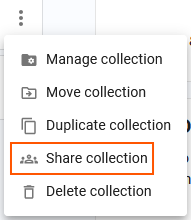
- Click on the icon with three dots
 located at the right corner of the collection.
- Click on "Share collection."
4. Verify Sharing Status:
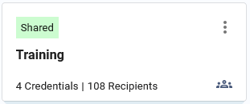
- A green tag labeled "Shared Collection" will appear, indicating that the collection can now be shared with specific trainers.
5. (Optional) Share Access with Trainers, to learn more, click here.
Once the collection is shared, all certificates added to this collection will be available to the trainers who have been invited to it. This allows trainers to issue these certificates and badges as needed through the trainer module.
How to unshare a shared collection?
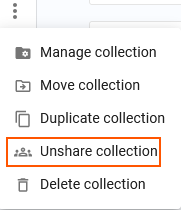
- Click on the icon with three dots located at the right corner of the collection.
- Select “Unshare collection.” That’s it! The collection will no longer be shared with the Trainer Module.