
When a recipient has been awarded multiple credentials within the same template, you can choose how they receive them via email. Virtualbadge.io offers two delivery modes:
Grouped Delivery (Default)
When multiple credentials within the same template are linked to the same email address, the recipient receives one combined email containing all their credentials. This is the default setting and keeps your recipients' inboxes cleaner.
Single Delivery
Each credential within a template is delivered as its own separate email, even if the recipient has multiple credentials under the same template.
How to Change the Delivery Mode
- Go to Settings.
- Click on Organisation.
- Look for the "Email Delivery" section.
- Select either Grouped or Single delivery.
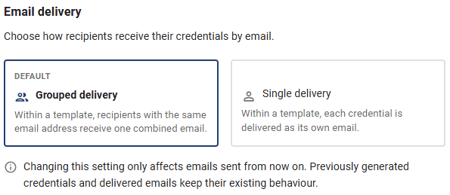
Note: Changing this setting only affects recipients added after the update. Existing recipients will continue to receive emails based on the delivery mode that was active when they were added.